
You can use our sales pipeline editor to define one or more sales pipelines, their phases and the duration of the corresponding phases. The duration of a phase indicates when a lead is considered overdue. If you want to use the follow-up mail, it is absolutely necessary to specify the phase duration because this is taken as the basis for the due date of a phase. You can set both the phase duration and the follow-up emails directly in the sales pipeline editor, which you can access via Settings (1) and Sales Pipelines (2):
Select the tile whose settings you want to adjust. The tabs Sales Process and Follow Up now appear in the lower part of your window:
By clicking on the small pencil icon on the right side, you can adjust the phase duration of a phase on the Sales Pipeline tab:
Do not forget to confirm your changes by clicking on the green tick (2) and to save them by clicking on Save (3).
You also have the option of switching to the Follow up tab, from where you can set whether follow-up emails, so-called reminders, should be sent to the sales partners if a lead is overdue. To do so, proceed as follows:
1. First, activate the follow-up emails by sliding the slider under (1) to the right
2. Set the interval (2) as well as the unit of the interval (3) after which you want to follow up; for example 1 week
3. Save the entries with a click on Save.
If a lead is overdue, the lead acceptor receives the first follow-up email on the next day. The email dispatch is currently triggered in the morning at 07:00 UTC (09:00 CET summer time, 08:00 CET winter time). The subsequent follow-up intervals are then based on the day on which the first follow-up email was sent. In our concrete example, we had set a week as the follow-up interval. If a lead is overdue on Monday, the sales partner receives the first follow-up email on the following day (Tuesday). He then receives the next follow-up email on the following Tuesday. A typical follow-up email looks like this:
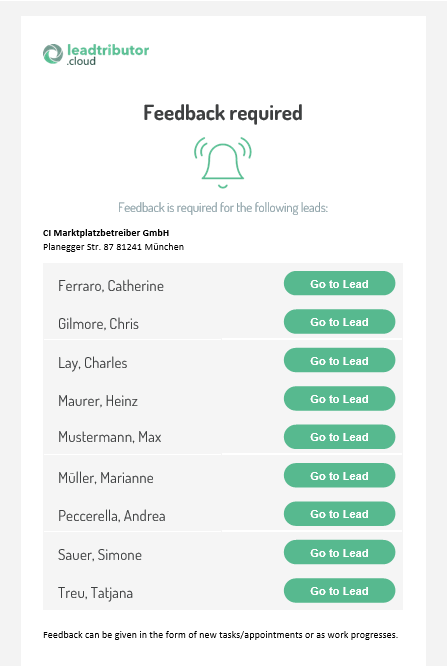
If the follow-up email is activated, the lead acceptor can only get rid of the follow-up emails by providing feedback on the leads, for example by:
- A status change in the sales process of the respective lead
- Entering a date in the future for the lead
- Creating a task for the lead
Comments
0 comments
Please sign in to leave a comment.