
As from now on, the new form field select list can be set in our lead form. This makes it possible to store lists of values in a field of a lead. A simple example could be the field product category, in which the product categories relevant to the manufacturer are entered, such as "awnings, roller blinds, pleated blinds", if the customer is a manufacturer of shading solutions:
What's new?
-
The configuration of the field type select list is done analogously to the previous types via the form configuration page. In an additional input field, the possible values for the list field are listed and their order in the resulting selection list is determined by drag&drop.
- In addition, the function of the field can be further defined by the two options Enable multi select and Allow custom values. Both options can be selected independently of each other and have a corresponding effect on the editing and display of a lead.
Enable multi select: Allows multiple values or only the selection of a single value. Single values are displayed like text fields in the read view, list fields with multiple values are displayed as so-called chips. 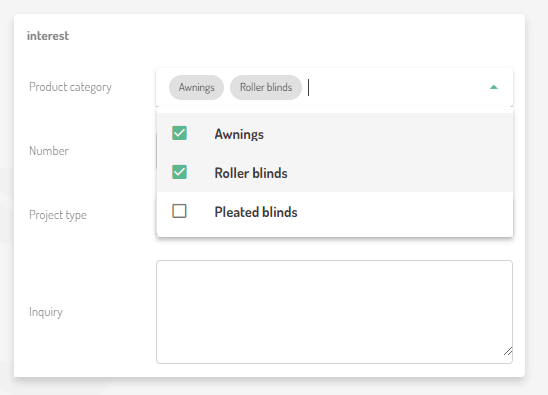
Allow custom values: This switches back and forth between the selection list and the suggestion list, as this option allows or prohibits the entry of values that have not been defined in the selection options/suggestions of the field definition. If this check mark is set, the editor would be able to enter further values in the corresponding field, e.g. sunshades.
- Since the introduction of mandatory fields, the importance of the form for the display and processing of leads on the lead detail and lead creation page has changed significantly. The form firmly specifies the structure and sequence of the minimum mandatory fields in a lead, and for editing leads on the lead detail page, leads must always meet the requirements of the form, no new fields can be added and no existing fields can be removed, the mandatory fields must always be filled before saving.
-
Changes to the structure of a lead can now only be made via the form definition. An attempt is always made to automatically adapt the values in the fields of a lead to the new definition of the form. However, if the definition of a form field changes in such a way that the value of a field in a lead no longer matches the new form field type, the user is informed of this via a note on the corresponding form field:
He now has the option of adapting the lead to the new values by selecting one of the currently existing values and then confirming by clicking on the green tick or discarding the entry by clicking on the grey cross.
When does it change?
The release took place on March 22, 2023.
Outlook
With the roll-out of the selection lists, we have taken another preparatory step towards the long-awaited lead partner matching feature, the roll-out of which we hope to be able to report on soon :-)
Comments
0 comments
Please sign in to leave a comment.