
Learn how to edit, modify, add and close your accepted leads.
1. The Sales Pipeline
All leads have a predefined sales pipeline:
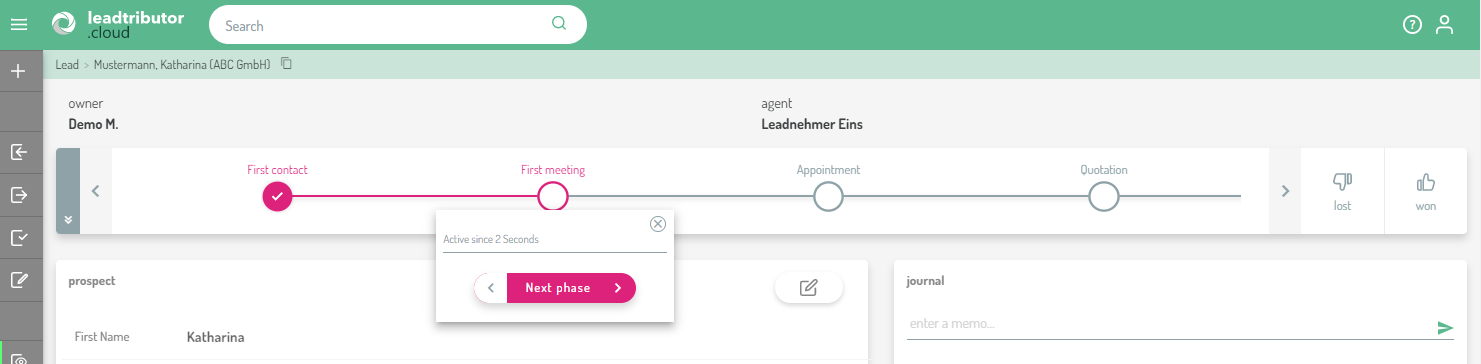
Sales pipelines are defined per marketplace and include different sales phases. Your own leads also have a fixed pipeline. To keep your leads up-to-date, please put each lead in the right phase and change it as soon as you reach the next phase.
An example sales pipeline might look like this:

When you have completed a new phase (for example, when you had a first call with the customer) simply click on the corresponding item. The colour will then change and the new phase starts.
If you ever forget to update your lead, you will receive a reminder by email. Here you have the possibility to give feedback directly from the email.
2. The Lead Journal
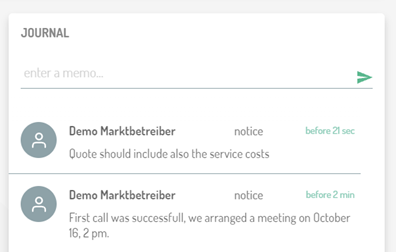
In the lead journal, you can store notes and document any information relevant for processing the lead. The entries are sorted chronologically so that you always see your most recent entry at the top:
3. Edit lead fields
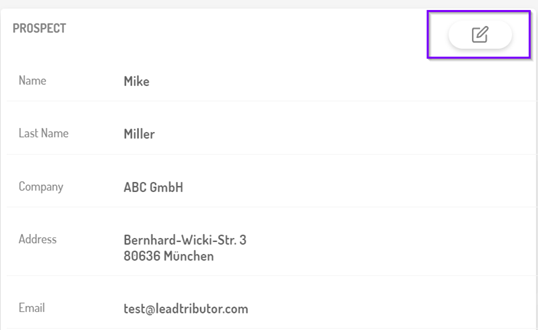
You also have the option to update and change the information in your leads.
a) Open the lead in edit mode.
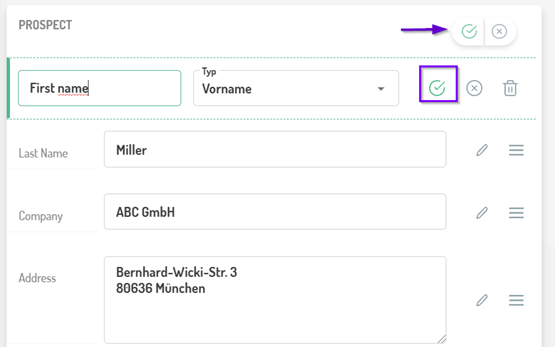
b) Add the changes or new details in the lead and confirm them with the green tick.
Comments
0 comments
Please sign in to leave a comment.